মনে করি আমাদের কাছে কমেন্ট লিস্ট এবং এর form এর html আছে আমরা এটাকে ওয়ার্ডপ্রেস এর দ্বারা ডাইনামিক করতে চাচ্ছি
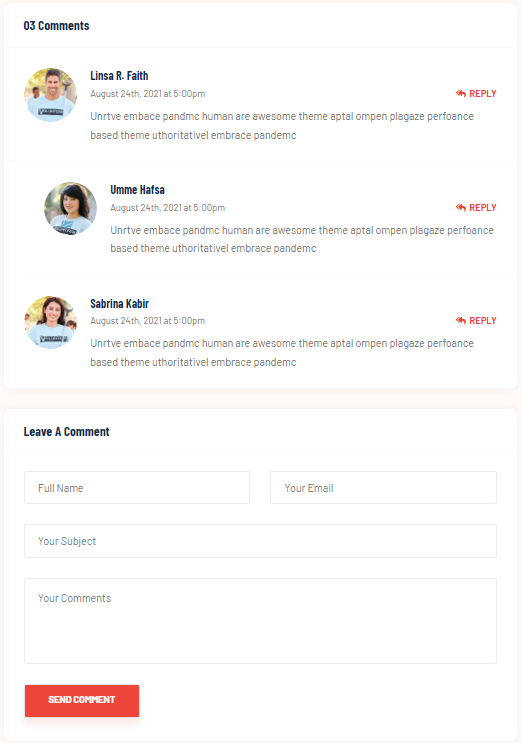
Comment Form HTML Structure
<div class="widget widget-comment">
    <div class="widget-header">
        <h5 class="title">Leave a Comment</h5>
    </div>
    <div class="widget-body">
        <form class="comment-form">
            <div class="form-group">
                <input type="text" placeholder="Full Name" name="name">
            </div>
            <div class="form-group">
                <input type="email" placeholder="Your Email" name="email">
            </div>
            <div class="form-group w-100">
                <input type="text" placeholder="Your Subject" name="subject">
            </div>
            <div class="form-group w-100">
                <textarea name="message" placeholder="Your Comments"></textarea>
            </div>
            <div class="form-group">
                <button type="submit" class="custom-button"><span>Send Comment</span></button>
            </div>
        </form>
    </div>
</div>
widget widget-comment: This is the outer container that holds both the header and the form.widget-header: This section contains the title of the comment form.widget-body: This section holds the actual form where users can submit their comments.
Comment List HTML Structure
<div class="widget widget-comment">
    <div class="widget-header">
        <h5 class="title">03 Comments</h5>
    </div>
    <div class="widget-body p-0">
        <ul class="comment-area">
            <li>
                <div class="comment-item">
                    <div class="comment-thumb">
                        <a href="#"><img src="assets/images/volunteer/01.jpg" alt="blog"></a>
                    </div>
                    <div class="comment-content">
                        <div class="comment-header">
                            <h6 class="title"><a href="#">Linsa R. Faith</a></h6>
                            <a href="#" class="info">August 24th, 2021 at 5:00pm</a>
                            <a href="#" class="reply"><i class="fas fa-reply-all"></i>Reply</a>
                        </div>
                        <p>Your comment text goes here...</p>
                    </div>
                </div>
                <ul>
                    <li>
                        <div class="comment-item">
                            <div class="comment-thumb">
                                <a href="#"><img src="assets/images/volunteer/02.jpg" alt="blog"></a>
                            </div>
                            <div class="comment-content">
                                <div class="comment-header">
                                    <h6 class="title"><a href="#">Umme Hafsa</a></h6>
                                    <a href="#" class="info">August 24th, 2021 at 5:00pm</a>
                                    <a href="#" class="reply"><i class="fas fa-reply-all"></i>Reply</a>
                                </div>
                                <p>Your reply comment text goes here...</p>
                            </div>
                        </div>
                    </li>
                </ul>
            </li>
            <li>
                <div class="comment-item">
                    <div class="comment-thumb">
                        <a href="#"><img src="assets/images/volunteer/03.jpg" alt="blog"></a>
                    </div>
                    <div class="comment-content">
                        <div class="comment-header">
                            <h6 class="title"><a href="#">Sabrina Kabir</a></h6>
                            <a href="#" class="info">August 24th, 2021 at 5:00pm</a>
                            <a href="#" class="reply"><i class="fas fa-reply-all"></i>Reply</a>
                        </div>
                        <p>Your comment text goes here...</p>
                    </div>
                </div>
            </li>
        </ul>
    </div>
</div>
widget-header: Displays the number of comments (e.g., “03 Comments”).comment-area: A list of comments where each comment is represented as an<li>element.comment-item: Contains the individual comment’s details including the avatar, author name, date, time, and comment text.
আমরা প্রথমে comments.php নামে ফাইল বানাবো এবং functions.php তে একটি কলব্যাক মেথড লিখবো কমেন্ট এর লিস্ট শো করানোর জন্য
comments.php
<?php
// If the post is password-protected, return early without loading the comments.
if ( post_password_required() ) {
    return;
}

// Start of the comment list
if ( have_comments() ) : ?>
    <div class="widget widget-comment">
        <div class="widget-header">
            <h5 class="title">
                <?php
                $comment_count = get_comments_number();
                echo $comment_count . ' Comments';
                ?>
            </h5>
        </div>
        <div class="widget-body p-0">
            <ul class="comment-area">
                <?php
                // List the comments using a custom callback function for HTML structure
                wp_list_comments( array(
                    'style'       => 'ul',
                    'short_ping'  => true,
                    'avatar_size' => 60,
                    'callback'    => 'custom_comment_callback',
                ) );
                ?>
            </ul>
        </div>
    </div>
<?php
endif;

// Display a message if comments are closed but there are comments
if ( ! comments_open() && get_comments_number() ) :
    echo '<p class="no-comments">' . __( 'Comments are closed.' ) . '</p>';
endif;
?>
functions.php
function custom_comment_callback($comment, $args, $depth) {
    ?>
    <li <?php comment_class(); ?> id="comment-<?php comment_ID(); ?>">
        <div class="comment-item">
            <div class="comment-thumb">
                <a href="#">
                    <?php echo get_avatar( $comment, 60 ); // Display user avatar ?>
                </a>
            </div>
            <div class="comment-content">
                <div class="comment-header">
                    <h6 class="title">
                        <a href="#"><?php comment_author(); // Display the comment author's name ?></a>
                    </h6>
                    <a href="#" class="info">
                        <?php echo get_comment_date(); // Display comment date ?>
                        at <?php echo get_comment_time(); // Display comment time ?>
                    </a>
                    <a href="#" class="reply">
                        <i class="fas fa-reply-all"></i>
                        <?php comment_reply_link( array_merge( $args, array( 'depth' => $depth, 'max_depth' => $args['max_depth'] ) ) ); // Display reply link ?>
                    </a>
                </div>
                <p><?php comment_text(); // Display comment text ?></p>
            </div>
        </div>

        <?php if ( $args['has_children'] ) : ?>
            <ul class="children">
        <?php endif;
}
?>
comment form in comments.php add below line
<div class="widget widget-comment">
    <div class="widget-header">
        <h5 class="title">Leave a Comment</h5>
    </div>
    <div class="widget-body">
        <?php
        $comment_form_args = array(
            'fields'               => array(
                'author' => '<div class="form-group"><input type="text" name="author" placeholder="Full Name" required></div>',
                'email'  => '<div class="form-group"><input type="email" name="email" placeholder="Your Email" required></div>',
                'url'    => '<div class="form-group w-100"><input type="text" name="url" placeholder="Your Subject"></div>',
            ),
            'comment_field'        => '<div class="form-group w-100"><textarea name="comment" placeholder="Your Comments" required></textarea></div>',
            'submit_button'        => '<div class="form-group"><button type="submit" class="custom-button"><span>Send Comment</span></button></div>',
            'class_submit'         => 'custom-button',
        );

        comment_form($comment_form_args);
        ?>
    </div>
</div>